Encryption Architecture
Intended for developers. This page documents the full cryptographic implementation, key hierarchy, data formats, and control flows in darkVault.
1. Key Hierarchy
darkVault uses envelope encryption: files are encrypted with a random Data Encryption Key (DEK), and the DEK itself is encrypted (wrapped) by two separate keys — one derived from the master password, one a random Recovery Key.
Master Password (user input — never stored)
         │
         │  PBKDF2WithHmacSHA256
         │  iterations : 100,000
         │  key length : 256 bits
         │  salt       : 16 bytes (random, stored in vault.key as kekSalt)
         ▼
        KEK  ─── Key Encryption Key (exists only in RAM during unlock)
         │
         │  AES-256-GCM wrap
         ▼
┌──────────────────────────────────────────────┐
│              vault.key  (on Google Drive)    │
│                                              │
│  kekSalt            : 16 bytes (base64)      │
│  dekWrappedByKek    : 60 bytes (base64)  ◄───┤─── KEK wraps DEK
│  dekWrappedByRecovery: 60 bytes (base64) ◄───┤─── Recovery Key wraps DEK
└──────────────────────────────────────────────┘
         │
         │  AES-256-GCM unwrap (with correct KEK or Recovery Key)
         ▼
        DEK  ─── Data Encryption Key (256-bit random, lives only in VaultSession RAM)
         │
         │  AES-256-GCM  (unique random IV per file)
         ▼
  *.vault files  (on Google Drive — ciphertext only, never plaintext)
Key roles
| Key | Type | Bits | Where it lives | Lifetime |
|---|---|---|---|---|
| Master Password | User passphrase | variable | User's memory | Never stored |
| KEK | PBKDF2 output | 256 | RAM only | Duration of unlock operation |
| DEK | Random AES key | 256 | RAM (VaultSession) + wrapped in vault.key | Session lifetime |
| Recovery Key | Random AES key | 256 | User writes it down | Permanent (external) |
2. Cryptographic Primitives
All primitives are from javax.crypto (Android's built-in JCA provider). No third-party crypto libraries.
| Primitive | Algorithm | Parameters |
|---|---|---|
| Key derivation | PBKDF2WithHmacSHA256 | 100,000 iterations, 256-bit output, 16-byte random salt |
| File encryption | AES/GCM/NoPadding | 256-bit key, 12-byte IV, 128-bit auth tag |
| DEK wrapping | AES/GCM/NoPadding | 256-bit key, 12-byte IV, 128-bit auth tag |
| Biometric credential | AES/GCM/NoPadding | 256-bit key (Android Keystore), 12-byte IV |
| Password verification | PBKDF2WithHmacSHA256 + MessageDigest.isEqual | Constant-time comparison |
| CSPRNG | SecureRandom.nextBytes() | Platform DRBG |
3. vault.key Format
vault.key is stored as a UTF-8 JSON file in the root of the vault folder on Google Drive. It is created once during setup and updated only on password change or recovery key rotation.
{
  "version": 1,
  "kekSalt": "<base64(16 bytes)>",
  "dekWrappedByKek": "<base64(60 bytes)>",
  "dekWrappedByRecovery": "<base64(60 bytes)>"
}
Wrapped DEK blob format (60 bytes)
┌─────────────────────────────────────────────────────┐
│  Bytes 0–11  : GCM IV (12 bytes, random)            │
│  Bytes 12–43 : AES-GCM ciphertext of DEK (32 bytes) │
│  Bytes 44–59 : GCM authentication tag (16 bytes)    │
└─────────────────────────────────────────────────────┘
              Total: 60 bytes → ~80 chars base64
The GCM auth tag makes it impossible to tamper with the wrapped DEK without detection. An incorrect unwrapping key produces an AEADBadTagException rather than silently returning garbage.
Relevant code:
- VaultKeyBundle.kt — serialization / deserialization
- VaultKeyManager.wrapDek() / unwrapDek() — wrapping logic
- AuthViewModel.createAndUploadDek() — creation during setup
- DriveApiClient.uploadVaultKey() / downloadVaultKey() — Drive I/O
4. Vault File Format
Each uploaded file is stored with a .vault extension. Three format versions exist for backward compatibility.
Version 0x03 — Current (DEK-based, envelope encryption)
┌──────┬──────────────────┬──────────────────────────────────┐
│  1B  │     12 bytes     │      N + 16 bytes                │
│ 0x03 │   GCM IV (rand)  │  GZIP(plaintext) encrypted w/    │
│      │                  │  DEK + 16-byte GCM auth tag      │
└──────┴──────────────────┴──────────────────────────────────┘
- Plaintext is GZIP-compressed before encryption (reduces upload size)
- IV is unique per file, generated fresh each upload
- The 16-byte GCM tag authenticates both the IV-bound ciphertext and detects tampering
Version 0x02 — Legacy (per-file key derivation)
┌──────┬──────────────┬────────────┬──────────────────────────┐
│  1B  │   16 bytes   │  12 bytes  │      N + 16 bytes        │
│ 0x02 │  PBKDF2 salt │  GCM IV   │  GZIP(plaintext) AES-GCM │
└──────┴──────────────┴────────────┴──────────────────────────┘
Each file stores its own PBKDF2 salt. The AES key is derived fresh from password + salt for every decrypt. This format is read-only (new uploads always use 0x03).
Version 0x00 — Original legacy (no version byte, no GZIP)
Files created before the versioning scheme have no leading version byte. The first byte of the 16-byte PBKDF2 salt is treated as the start of the file. No compression.
Relevant code:
- CryptoManager.encrypt() — writes v0x02
- CryptoManager.encryptWithDek() — writes v0x03
- CryptoManager.decrypt() — reads all three versions (version-switched on first byte)
5. Authentication State Machine
                    ┌──────────────────────┐
         App start  │       AuthState      │
         ──────────►│        Init          │
                    └──────────┬───────────┘
                               │ initializeAuth()
                    ┌──────────▼───────────┐
                    │   Check last signed- │
                    │   in Google account  │
                    └──────────┬───────────┘
                  no account   │   account found
              ┌────────────────┤
              ▼                ▼
         ┌──────────┐  ┌──────────────────┐
         │  SignIn  │  │  CheckingVault   │
         └──────────┘  └────────┬─────────┘
                     Drive probe │
               ┌─────────────────┼─────────────────┐
         vault.key               │            no vault.key
         found                   │            found
              │           UserRecoverable    │
              ▼           AuthException      ▼
         ┌──────────┐          │        ┌──────────┐
         │  Unlock  │          ▼        │  Setup   │
         └─────┬────┘   ┌────────────┐  └─────┬────┘
               │        │NeedsConsent│        │
               │        └────────────┘        │ setup()
               │ unlock()                     │ DEK created
               │ DEK unwrapped                │ vault.key uploaded
               └──────────────┬───────────────┘
                              ▼
                         ┌──────────┐
                         │   Home   │◄──── biometric unlock
                         └─────┬────┘      (AppLocked → Home)
                               │
                      onAppBackground()
                               │
                 biometric?    │    no biometric
              ┌────────────────┤
              ▼                ▼
         ┌──────────┐  timer expires / manual lock
         │AppLocked │  ┌──────────┐
         └──────────┘  │  Unlock  │
                       └──────────┘
Key states:
| State | DEK in RAM | Password in RAM | Drive needed |
|---|---|---|---|
| Init | No | No | No |
| SignIn | No | No | No |
| CheckingVault | No | No | Yes |
| Setup | No | Yes (creating) | Yes |
| Unlock | No | No | Yes (on unlock) |
| AppLocked | Yes | Yes | No |
| Home | Yes | Yes | For file ops |
Relevant code: AuthState sealed class and AuthViewModel in viewmodel/AuthViewModel.kt
6. Unlock Flow (Password Path)
User types password
        │
        ▼
 lockout check  ──── locked? ──► show countdown timer
        │
        │  online path (Google account available)
        ▼
 Download vault.key from Drive
        │
        ▼
 PBKDF2(password, kekSalt, 100k) → KEK
        │
        ▼
 AES-GCM unwrap dekWrappedByKek with KEK
        │                  │
   AEADBadTagException    success
        │                  │
        ▼                  ▼
 check local hash:    DEK → VaultSession.dek
 matches? → password     │
 changed on other device  ▼
                    AuthState.Home
                    autoLock timer starts
        │
        │  offline fallback path (no network / Drive unavailable)
        ▼
 PBKDF2(password, storedSalt) → compare with DataStore hash
        │
   mismatch          match
        │                │
        ▼                ▼
 recordFailedAttempt   getCachedVaultKey() from DataStore
 exponential backoff       │
 (30s, 60s … 30 min)   (kekSalt, dekWrappedByKek) found?
                        │                │
                       No               Yes
                        │                │
                        ▼                ▼
                  AuthState.Home   PBKDF2(password, kekSalt) → KEK
                  (DEK null —      AES-GCM unwrap dekWrappedByKek
                   online unlock    → DEK → VaultSession.dek
                   needed)          │
                                    ▼
                              AuthState.Home
                              (DEK in memory — pinned
                               files fully accessible)
Exponential backoff schedule:
| Failed attempts | Lockout duration |
|---|---|
| 1–4 | None |
| 5 | 30 seconds |
| 6 | 60 seconds |
| 7 | 2 minutes |
| 8 | 4 minutes |
| … | doubles each time |
| Cap | 30 minutes |
Relevant code: AuthViewModel.unlock(), AuthViewModel.tryUnlockWithVaultKey()
7. Unlock Flow (Biometric Path)
Fingerprint prompt shown (BiometricPrompt.CryptoObject)
        │
        ▼
Android Keystore unlocks AES key (alias: darkvault_bio_v1)
        │
        ▼
Keystore cipher decrypts (DataStore blob) → master password plaintext
        │
        ▼
setActiveSession(password) — password held in RAM, timer reset=false
(biometric unlock does NOT restart the session timeout clock)
        │
        ▼
AuthState.Home
The Keystore key has setUserAuthenticationRequired(true) and setInvalidatedByBiometricEnrollment(true). Adding a new fingerprint to the device automatically destroys this key, forcing re-enrollment.
Relevant code: BiometricKeyManager.kt, AuthViewModel.unlockWithBiometricCipher()
8. Setup Flow (First-time vault creation)
User chooses master password
        │
        ▼
 PBKDF2(password, newSalt) → hash saved to DataStore
        │
        ▼
 SecureRandom.nextBytes(32) → DEK
 SecureRandom.nextBytes(32) → Recovery Key
 SecureRandom.nextBytes(16) → kekSalt
        │
        ▼
 PBKDF2(password, kekSalt) → KEK
        │
        ▼
 wrapDek(DEK, KEK)           → dekWrappedByKek
 wrapDek(DEK, RecoveryKey)   → dekWrappedByRecovery
        │
        ▼
 VaultKeyBundle {kekSalt, dekWrappedByKek, dekWrappedByRecovery}
        │
        ▼
 Upload as vault.key to Drive vault folder
        │
        ▼
 DEK → VaultSession.dek (in-memory)
 Recovery Key → shown to user ONE TIME as formatted hex, then zeroed
 KEK → zeroed from RAM
        │
        ▼
 AuthState.Home
Relevant code: AuthViewModel.setup(), AuthViewModel.createAndUploadDek()
9. Password Change Flow
Password change re-wraps the DEK with the new KEK. The DEK itself and all encrypted files are unchanged.
Verify currentPassword against DataStore hash
        │
        ▼
Download vault.key from Drive (with ETag/modifiedTime for conflict detection)
        │
        ▼
PBKDF2(currentPassword, kekSalt) → currentKEK
AES-GCM unwrap dekWrappedByKek  → DEK
Zero currentKEK immediately
        │
        ▼
SecureRandom.nextBytes(16) → newKekSalt
PBKDF2(newPassword, newKekSalt) → newKEK
wrapDek(DEK, newKEK) → new dekWrappedByKek
Zero newKEK
        │
        ▼
VaultKeyBundle {newKekSalt, new dekWrappedByKek, OLD dekWrappedByRecovery}
        │
        ▼
updateVaultKeyInPlace() — Drive If-Match header prevents write conflicts
        │
   conflict (retry up to 3x)    success
        │                            │
        ▼                            ▼
retry download + re-wrap     Save new PBKDF2 hash to DataStore
                             Clear biometric DataStore creds (stale)
                             Zero DEK from RAM
                             lockAfterPasswordChange() — force re-auth
Note: dekWrappedByRecovery is preserved unchanged. The Recovery Key continues to work after a password change.
Relevant code: AuthViewModel.changePassword()
10. Recovery Key Flow
When the master password is forgotten:
User enters Recovery Key (formatted hex string, e.g. A1B2C3D4-...)
        │
        ▼
parseRecoveryKey() → 32 raw bytes
        │
        ▼
Download vault.key from Drive
        │
        ▼
AES-GCM unwrap dekWrappedByRecovery with recoveryKeyBytes
        │
   AEADBadTagException      success
        │                       │
        ▼                       ▼
"Recovery key is          Generate newKekSalt
 incorrect"               PBKDF2(newPassword, newKekSalt) → newKEK
                          wrapDek(DEK, newKEK) → dekWrappedByKek
                          Zero newKEK, zero recoveryKeyBytes
                                  │
                                  ▼
                          updateVaultKeyInPlace()
                                  │
                                  ▼
                          Save new hash to DataStore
                          DEK → VaultSession.dek
                          AuthState.Home
Relevant code: AuthViewModel.recoverWithRecoveryKey()
11. File Encryption / Decryption Data Flow
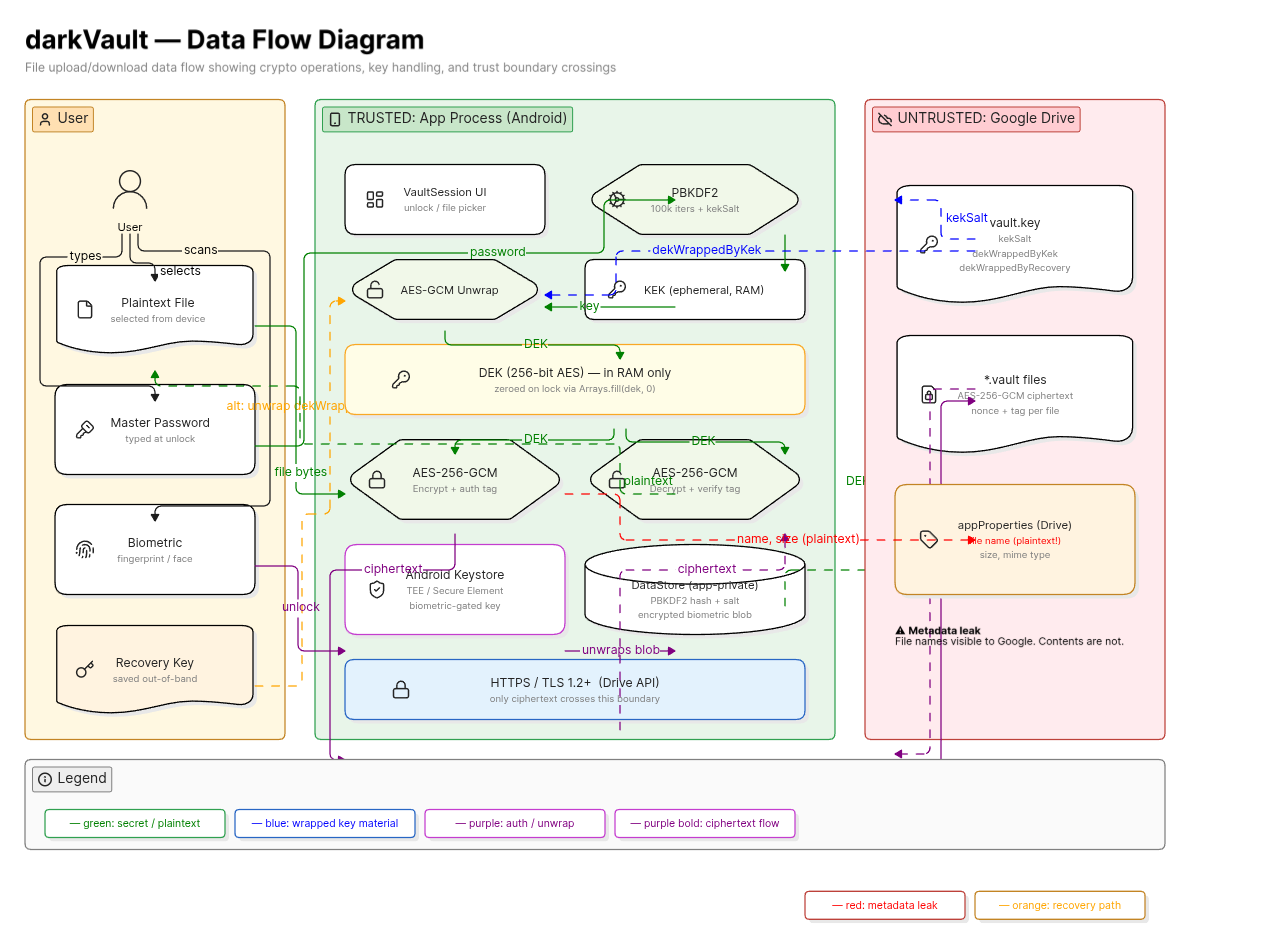
UPLOAD
──────
ContentResolver.openInputStream(uri)
        │
        ▼
VaultSession.dek (from memory)
        │
        ├─ GZIP compress plaintext bytes in RAM
        │
        ├─ SecureRandom IV (12 bytes)
        │
        ├─ AES-256-GCM encrypt (DEK + IV)
        │
        ├─ Write: [0x03][IV][ciphertext+tag]
        │
        └─ Upload to Drive via chunked resumable upload (256 KB chunks)
           originalName stored in Drive appProperties (truncated to 100 chars)
           Duplicate detection: query appProperties.originalName before upload


DOWNLOAD / PREVIEW
──────────────────
Drive file download → encrypted bytes in RAM
        │
        ▼
Read version byte
        │
        ├─ 0x03: read IV (12B), decrypt with DEK → GZIP decompress → plaintext bytes
        ├─ 0x02: read salt (16B) + IV (12B), PBKDF2(password, salt) → key, decrypt → GZIP decompress
        └─ 0x00: read salt (16B) + IV (12B), PBKDF2(password, salt) → key, decrypt (no GZIP)
        │
        ▼
Plaintext bytes held in RAM only
Image preview: BitmapFactory.decodeByteArray() — never written to disk
Other files: streamed to ContentResolver output stream for save
12. DEK Lifecycle
Created:       AuthViewModel.createAndUploadDek()  — first launch (setup)
Loaded:        AuthViewModel.tryUnlockWithVaultKey() — on each online unlock with password
               AuthViewModel.unlock() offline path  — re-derived from cached vault key bundle
In memory:     VaultSession.dek (volatile ByteArray?)
Used by:       CryptoManager.encryptWithDek() / decryptWithDek()
               UploadForegroundService (accesses VaultSession.dek directly)
               LocalVaultCache.put() / getEncryptedBytes() (encrypts/decrypts disk cache)
               FolderMetadataStore.put() / get() (encrypts/decrypts folder listings)
Cached:        After every online unlock, kekSalt + dekWrappedByKek are written to
               DataStore (cached_kek_salt, cached_wrapped_dek). This is ciphertext —
               the DEK itself is never written to disk.
Zeroed:        VaultSession.clearDek() — Arrays.fill(dek, 0); dek = null
Cleared on:    lockVault(auto=false), signOut(), session timeout, process death
NOT cleared:   lockVault(auto=true) with biometric/NFC enrolled → AppLocked state
               (DEK stays in RAM, biometric/NFC gates access)
Cache cleared: Only on sign-out / account switch (clearDriveState).
               Cold start (CheckingVault) does NOT wipe the disk cache —
               it calls resetInMemoryState() which clears only in-memory state.
13. Offline Vault Key Cache
To support offline unlock with DEK recovery, darkVault stores a minimal bundle in DataStore after every successful online unlock.
What is stored:
| DataStore key | Content | Can decrypt files alone? |
|---|---|---|
cached_kek_salt |
16-byte PBKDF2 salt (base64) | No — requires master password |
cached_wrapped_dek |
AES-GCM wrapped DEK (60 bytes, base64) | No — requires master password |
The stored blob is identical in structure to dekWrappedByKek in vault.key on Drive. It is pure ciphertext — the master password is still required to re-derive the KEK and unwrap the DEK from it.
Offline unlock path (end to end):
1. User enters password (no network)
2. CryptoManager.verifyPassword(password, storedHash, storedSalt) — local check
   → fail: record attempt, apply backoff
   → pass: continue
3. PreferencesManager.getCachedVaultKey() → (kekSalt, dekWrappedByKek)
   → not found: AuthState.Home with DEK=null (online unlock needed for file access)
   → found: continue
4. PBKDF2(password, kekSalt, 100k) → KEK
5. VaultKeyManager.unwrapDek(dekWrappedByKek, KEK)
   → AEADBadTagException: DEK restore fails silently (cache corrupt / password changed)
   → success: DEK → VaultSession.dek
6. Arrays.fill(KEK, 0) — zeroed in finally block
7. AuthState.Home — offline pinned files are fully accessible
Security note: The cached bundle is cleared when the user signs out (clearDriveState). It is NOT cleared on cold start or account check (CheckingVault → resetInMemoryState) so that pinned files survive the app being cleared from recents.
14. Three-Tier File Cache
All cached file data is encrypted with the session DEK before writing to disk. Plaintext is never persisted.
Tier 1 — EncryptedFileCache (RAM)
  64 MB LRU in-process cache. Keyed by (fileId, modifiedTime).
  Holds raw encrypted ByteArrays. Cleared on VaultSession.clearDek().

Tier 2 — LocalVaultCache (disk: filesDir/vault_cache/)
  Persistent encrypted-file cache. LRU eviction respects isPinned flag.
  Index: .index.json (opaque IDs + sizes only — no filenames).
  Sidecar: <fileId>.meta — AES-GCM encrypted {fileId, modifiedTime, size}.
  Pinned files survive cache eviction and are accessible offline.
  evict(fileId) called on permanent Drive deletion.
  Upload-staged entries have modifiedTime="" and adopt the real Drive
  timestamp on first access (avoids re-downloading freshly uploaded files).

Tier 3 — FolderMetadataStore (disk: filesDir/folder_meta/)
  Encrypted folder-listing cache (one file per folder).
  Enables stale-while-revalidate: cached listing shown instantly on cold
  start while Drive refresh runs in background.
  allCachedFiles(dek) aggregates all listings — used to populate the
  offline file index when Drive is unreachable.
Both disk caches are excluded from Android Auto Backup and device-transfer (backup_rules.xml, data_extraction_rules.xml).
15. Biometric Credential Storage
Android Keystore (hardware-backed on API 30+)
Key alias: darkvault_bio_v1
Flags: PURPOSE_ENCRYPT | PURPOSE_DECRYPT
       setUserAuthenticationRequired(true)
       setInvalidatedByBiometricEnrollment(true)
       API 30+: AUTH_BIOMETRIC_STRONG only

DataStore (encrypted app-private storage)
Stores: IV (12 bytes) + AES-GCM(masterPassword.toByteArray()) using Keystore key

Enrollment:
  BiometricKeyManager.getCipherForEncryption()
  → BiometricPrompt shows fingerprint dialog
  → cipher.doFinal(password.toByteArray()) → encrypted blob
  → prefs.saveBiometricCredentials(iv, encryptedBlob)

Unlock:
  BiometricKeyManager.getCipherForDecryption(storedIV)
  → BiometricPrompt shows fingerprint dialog (CryptoObject)
  → cipher.doFinal(encryptedBlob) → password bytes → String
  → setActiveSession(password, resetSessionTimer = false)
16. Session & Auto-lock Timers
Two independent timers run in AuthViewModel.viewModelScope:
autoLockJob — background lock timer (when app leaves foreground)
- Cancelled when app comes back to foreground
- On expiry: lockVault(auto=true)
- Only starts if neither biometric NOR NFC is enrolled; if either quick-unlock method is enrolled and password was entered this session, onAppBackground() triggers immediate AppLocked instead
sessionTimeoutJob — absolute session expiry (caps maximum session length)
- Starts on successful password entry; NOT reset by biometric unlocks
- Default: 60 minutes (configurable in Settings)
- On expiry: lockSessionExpired() → full vault lock even if in foreground
17. Code Map
| Concern | File |
|---|---|
| Key derivation, file encrypt/decrypt | crypto/CryptoManager.kt |
| DEK wrapping/unwrapping, recovery key format | crypto/VaultKeyManager.kt |
| Android Keystore biometric key lifecycle | crypto/BiometricKeyManager.kt |
| BiometricPrompt integration | crypto/BiometricHelper.kt |
| Auth state machine, setup, unlock, password change | viewmodel/AuthViewModel.kt |
| vault.key JSON model | model/VaultKeyBundle.kt |
| In-memory session holder | VaultSession.kt |
| DataStore preferences (hash, salt, biometric creds, offline key cache) | data/PreferencesManager.kt |
| Drive REST API (upload, download, vault.key ops) | drive/DriveApiClient.kt |
| Background upload, chunked protocol | service/UploadForegroundService.kt |
| RAM LRU cache of encrypted file bytes | cache/EncryptedFileCache.kt |
| Persistent encrypted-file disk cache + pinning | cache/LocalVaultCache.kt |
| Encrypted folder-listing disk cache | cache/FolderMetadataStore.kt |
| NFC tag unlock | nfc/NfcTagManager.kt |