Threat Model
This page defines what darkVault protects against, what attacks it is resistant to, known limitations, and areas of architectural debt. Intended for security reviewers and developers.
1. Assets
| Asset | Description | Sensitivity |
|---|---|---|
| Plaintext file contents | The actual files backed up by the user | Critical |
| Master password | User's passphrase — never stored | Critical |
| DEK (Data Encryption Key) | 256-bit AES key that directly encrypts files | Critical |
| Recovery Key | 256-bit key that can unwrap the DEK | Critical |
| KEK (Key Encryption Key) | PBKDF2 output, ephemeral | High |
| vault.key | Wrapped DEK + kekSalt, stored on Drive | High |
| Google OAuth token | Grants drive.file scope access | High |
| DataStore preferences | PBKDF2 hash, salt, biometric blob, offline vault key cache | Medium |
| Offline vault key cache | cached_kek_salt + cached_wrapped_dek — wrapped DEK ciphertext in DataStore; useless without master password |
Medium |
| Encrypted disk cache | vault_cache/ and folder_meta/ — AES-GCM encrypted file bytes and folder listings |
Medium |
| File metadata | Names, sizes, MIME types (stored in Drive appProperties) | Low-Medium |
2. Trust Boundaries
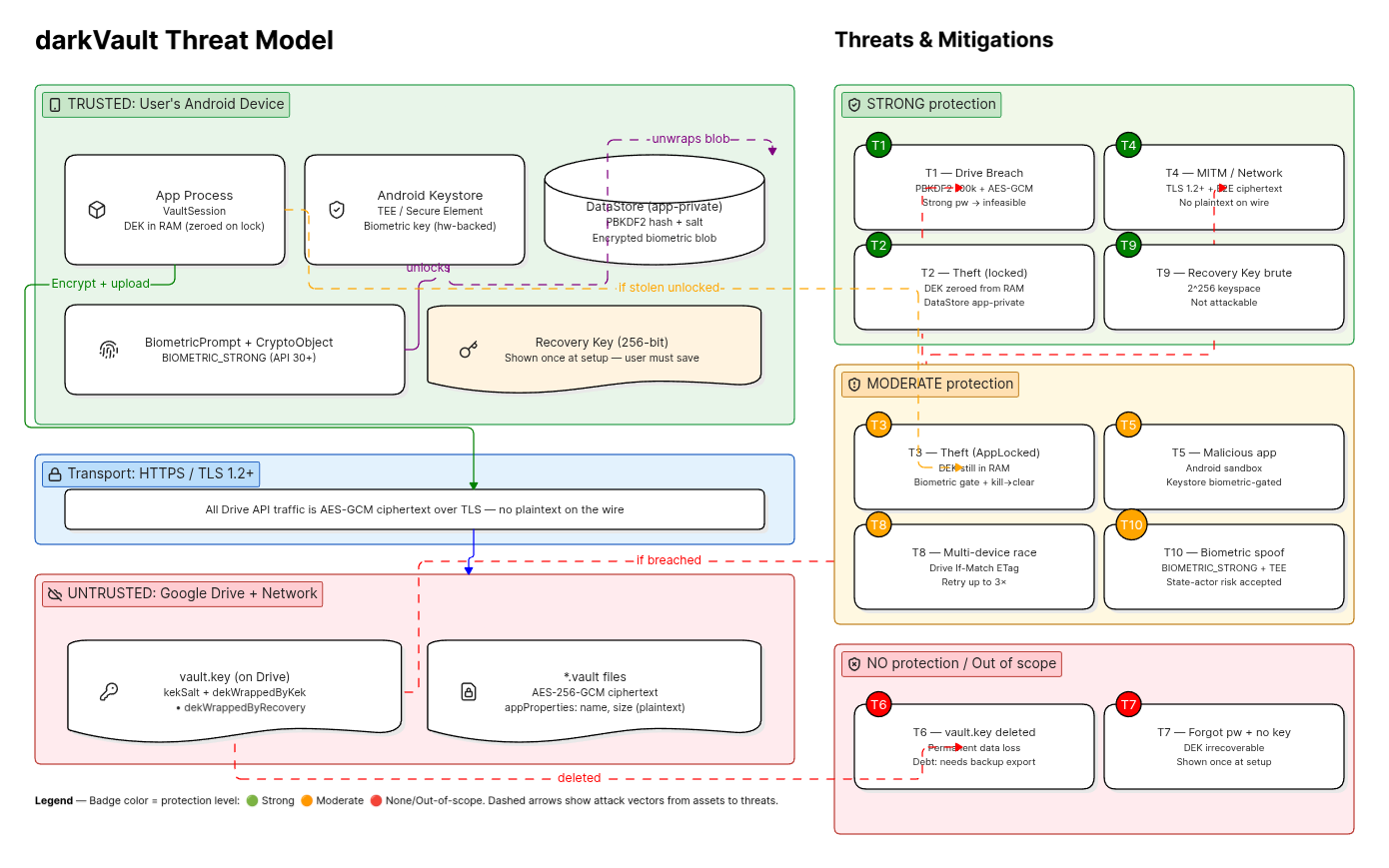
┌──────────────────────────────────────────────────────────────────┐
│  TRUSTED: User's device (Android process boundary)              │
│                                                                  │
│   ┌──────────────────┐    ┌───────────────────────────────┐     │
│   │  App process     │    │  Android Keystore (TEE/SE)    │     │
│   │  VaultSession    │    │  Biometric key (hw-backed)    │     │
│   │  DEK in RAM      │    │                               │     │
│   └──────────────────┘    └───────────────────────────────┘     │
│                                                                  │
│   ┌──────────────────────────────────────────────────────────┐  │
│   │  DataStore (app-private, OS-enforced)                    │  │
│   │  PBKDF2 hash+salt, encrypted biometric blob, vault ID    │  │
│   │  cached_kek_salt + cached_wrapped_dek (offline key cache)│  │
│   │  ↑ ciphertext only — master password required to use     │  │
│   └──────────────────────────────────────────────────────────┘  │
│                                                                  │
│   ┌──────────────────────────────────────────────────────────┐  │
│   │  filesDir (app-private, OS-enforced)                     │  │
│   │  vault_cache/ — AES-GCM encrypted file bytes (pinned)    │  │
│   │  folder_meta/ — AES-GCM encrypted folder listings        │  │
│   │  Both excluded from Android Backup                       │  │
│   └──────────────────────────────────────────────────────────┘  │
└──────────────────────────────────────────────────────────────────┘
         │  HTTPS (TLS 1.2+)
         ▼
┌──────────────────────────────────────────────────────────────────┐
│  UNTRUSTED: Google Drive                                         │
│                                                                  │
│   vault.key     — wrapped DEK (attacker gets this in Drive hack) │
│   *.vault files — AES-256-GCM ciphertext (unreadable without DEK)│
└──────────────────────────────────────────────────────────────────┘
         │
         ▼
┌──────────────────────────────────────────────────────────────────┐
│  UNTRUSTED: Network / Google infrastructure                      │
└──────────────────────────────────────────────────────────────────┘
3. Threat Analysis
T1 — Google Drive Account Compromised
Scenario: Attacker gains full access to the victim's Google Drive.
What the attacker has:
- All .vault files (AES-256-GCM ciphertext)
- vault.key containing kekSalt, dekWrappedByKek, dekWrappedByRecovery
What the attacker must do to read files:
1. Brute-force the master password offline using vault.key
2. Each guess requires: PBKDF2(guess, kekSalt, 100,000 iterations) → attempt AES-GCM unwrap
3. Success is confirmed by GCM auth tag acceptance (no false positives)
Attack cost (offline brute-force):
Password entropy vs. cracking resistance @ ~200,000 guesses/sec (GPU cluster):

  6-digit PIN         ─── ~0.08 seconds          ❌ Trivially crackable
  8-char dictionary   ─── hours to days           ❌ Crackable
  10-char mixed       ─── months to years         ⚠️  Marginal
  4-word passphrase   ─── billions of years       ✅ Computationally infeasible
  Random 128-bit key  ─── heat death of universe  ✅ Unconditionally safe
Mitigation: PBKDF2 at 100k iterations adds a ~500× cost multiplier over raw SHA-256. The primary protection is password quality.
Residual risk: Weak master passwords are crackable given vault.key. Strong passwords are not.
T2 — Device Theft (No Screen Lock Bypass)
Scenario: Device is stolen while app is locked or not running.
What the attacker has: Physical access to the Android device.
Protected by:
- DEK is zeroed from RAM on full vault lock (Arrays.fill(dek, 0))
- Master password is never written to DataStore
- DataStore contents (PBKDF2 hash, biometric blob) are app-private, OS-enforced
Outcome: No secrets recoverable without screen-lock bypass. Attacker must brute-force master password (same as T1 but without vault.key, so they also need Drive access).
T3 — Device Theft (App in AppLocked State)
Scenario: Device is stolen while app is in AppLocked state (biometric gate active — DEK still in RAM).
What the attacker has: Process memory containing the DEK.
Mitigations: - AppLocked UI blocks all file operations; fingerprint is required to resume - Full process kill (force-stop, reboot) clears RAM → DEK gone - Android's full-disk encryption protects RAM snapshots in storage
Residual risk: A sophisticated attacker with cold-boot attack capability or kernel exploit could extract the DEK from RAM. This is an accepted trade-off for biometric convenience; users who prefer maximum security should disable biometric unlock.
T4 — Network Interception (MITM)
Scenario: Attacker intercepts traffic between the app and Google Drive.
Mitigation: All Drive API calls use HTTPS with Android's default TLS stack. Plaintext is never transmitted — only AES-256-GCM ciphertext is uploaded. Even a complete MITM capturing all uploaded data yields only ciphertext.
Outcome: No plaintext exposure. MITM on vault.key upload gives attacker the same position as T1.
T5 — Malicious App / Android Sandbox Escape
Scenario: A malicious app on the same device attempts to read darkVault's data.
Mitigation: - DataStore is app-private (Android sandbox) - DEK lives in process memory only - Keystore key requires biometric auth before use; another app cannot trigger that prompt
Residual risk: A rooted device or kernel exploit breaks the sandbox. Not in scope for this threat model.
T6 — Vault.key File Lost (Deleted from Drive)
Scenario: User accidentally deletes the darkVault folder or vault.key from Drive.
vault.key deleted
        │
        ├─── Have Recovery Key? ─── No ──► Permanent data loss
        │                                  (dekWrappedByRecovery was IN vault.key)
        │
        └─── Yes ──────────────────────► Still permanent data loss
                                         (Recovery Key can unwrap DEK
                                          only IF vault.key exists)
Impact: All encrypted files become permanently unreadable. The DEK is irrecoverably gone.
Current mitigation: None — this is acknowledged architectural debt. A future vault.key export feature would address this.
T7 — Forgotten Master Password + No Recovery Key
Scenario: User forgets their password and never saved the Recovery Key.
Impact: Permanent data loss. The DEK cannot be recovered.
Mitigation: App shows Recovery Key exactly once at setup with a strong warning. No mitigation exists after this point.
T8 — Password Change Conflict (Multi-device Race)
Scenario: Two sessions attempt to update vault.key concurrently.
Mitigation: updateVaultKeyInPlace() uses a Drive If-Match ETag check. A stale update returns HTTP 412, triggering a retry (up to 3 attempts with fresh download each time).
T9 — Recovery Key Brute-force
Scenario: Attacker has vault.key and attempts to brute-force dekWrappedByRecovery.
Analysis: Recovery Key is 256 random bits. There is no KDF involved — the Recovery Key is used directly as the AES-GCM wrapping key. Brute-forcing 256-bit key space is computationally infeasible (2²⁵⁶ attempts).
Outcome: Not practically attackable.
T10 — Local Vault Key Cache Exfiltrated
Scenario: Attacker reads the app's DataStore (e.g., via root or backup extraction) and obtains cached_kek_salt and cached_wrapped_dek.
What the attacker has:
- kekSalt (16 bytes)
- dekWrappedByKek (60 bytes of AES-GCM ciphertext)
What the attacker must do to read files:
This is structurally identical to T1 (Drive compromise). The bundle has the same format as vault.key. The attacker must brute-force the master password to re-derive the KEK and unwrap the DEK.
Key difference from T1: The attacker does NOT need access to the user's Google Drive account — the bundle is on the local device. However, the cryptographic hardness is identical.
Mitigation: PBKDF2 at 100,000 iterations. App-private DataStore (OS sandbox). Android FDE at rest.
Residual risk: Root / sandbox escape exposes the bundle. Same brute-force constraint as T1 applies.
T11 — Biometric Spoofing
Scenario: Attacker uses a fake fingerprint or face scan to bypass biometric unlock.
Mitigation: darkVault uses BiometricPrompt with a CryptoObject — the Keystore cipher is only unlocked by a successful biometric authentication at the hardware/TEE level. Android's BIOMETRIC_STRONG class (API 30+) is required. Software-only biometric implementations are excluded.
Residual risk: Sufficiently high-quality spoofed biometrics (state actor level) could bypass the TEE. Accepted trade-off.
4. What darkVault Does NOT Protect Against
| Threat | Reason not in scope |
|---|---|
| Rooted device / kernel exploit | OS-level trust required for the sandbox to hold |
| Physical RAM extraction (cold boot) | Not practical for consumer devices; Android FDE mitigates |
| User error (sharing vault.key, weak password) | Social engineering / UX outside crypto scope |
| Loss of vault.key without backup | Architectural debt (see below) |
| Google account takeover + weak password | Password quality is user responsibility |
| Screen-lock bypass / device exploit | Android OS responsibility |
| Metadata privacy (file names, sizes) | Drive appProperties stores original file names in plaintext |
5. Metadata Exposure
File names and sizes are stored in Google Drive appProperties as part of the file record. This means:
- Google can see file names (truncated to 100 characters)
- Google can see file sizes (ciphertext size ≈ plaintext compressed size + 29 bytes overhead)
- Google cannot see file contents
If file name privacy is required, a future format version should encrypt the name into the ciphertext and use an opaque identifier as the Drive file name.
6. Known Architectural Debt
These are confirmed design limitations. Do not implement partial fixes — each requires a coordinated vault format migration.
| Issue | Impact | Fix required |
|---|---|---|
| No vault.key backup | vault.key loss = permanent data loss | Export encrypted vault.key copy |
| No chunked streaming AEAD | Large video files load entirely into RAM → OOM | Streaming AEAD with per-chunk tags |
| No conflict resolution | No updatedAt/version field for concurrent edits |
Add version field to file format |
| No Drive rate-limit backoff | Bulk operations may hit 403/429 | Exponential backoff with jitter |
| No integrity manifest | No HMAC'd index to detect file tampering or deletion | Signed file manifest |
| File name in plaintext | Metadata leaks original file names to Google | Encrypt names into ciphertext |
7. Summary
┌─────────────────────────────────────────────────────────────────────┐
│                      SECURITY POSTURE SUMMARY                       │
├────────────────────────┬───────────────────┬────────────────────────┤
│ Attack                 │ Protection        │ Notes                  │
├────────────────────────┼───────────────────┼────────────────────────┤
│ Drive breach           │ STRONG            │ Requires pw brute-force│
│ Network interception   │ STRONG            │ TLS + E2E encryption   │
│ Device theft (locked)  │ STRONG            │ DEK zeroed from RAM    │
│ Device theft (AppLock) │ MODERATE          │ DEK in RAM, biometric  │
│                        │                   │ gates access           │
│ Local cache exfiltrated│ STRONG            │ Same as Drive breach;  │
│ (DataStore / filesDir) │                   │ requires pw brute-force│
│ Forgotten password     │ MODERATE          │ Recovery Key required  │
│ Vault.key deletion     │ NONE              │ Permanent loss         │
│ Rooted device          │ NONE              │ Out of scope           │
│ Metadata (file names)  │ NONE              │ Plaintext in Drive     │
└────────────────────────┴───────────────────┴────────────────────────┘